Facade Mods Guide
How the game dresses its 3D buildings in pixel-art facades, and how to make, pack, load and share a mod that brings your own: the picture layout, the measurements in facades.json, how the game stacks and tiles them on real buildings, and what the game checks.
Contents
1. A mod in one minute
A mod is a zip file with one facades.json and three pictures for each facade. Nothing else in it is used and nothing in it is ever run.
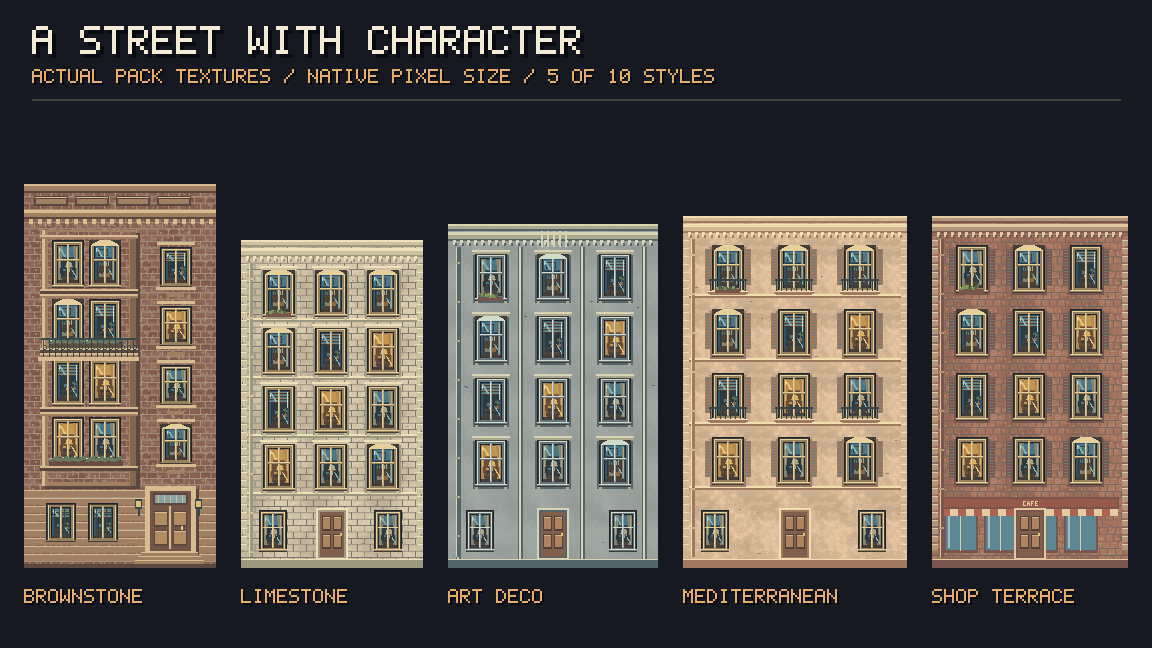
facade_<name>_top.png, _floors.png, _ground.png.facades.json (section 3).demo-mod.zip is a complete, working mod: three facades, a facades.json that uses every option, and a README.txt listing them. Load it with User Mod to see it, then change the pictures and the numbers. (The game's own facades are next to this guide too: facades.json and the facade_*_*.png pictures.)The game's own facades
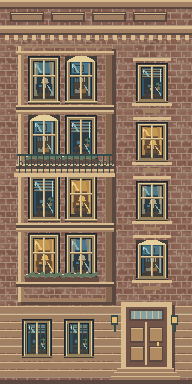
brownstone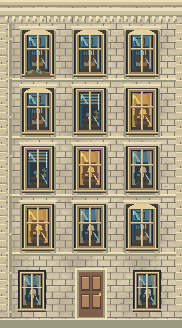
limestone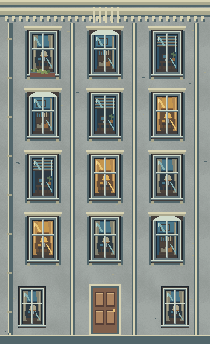
artdeco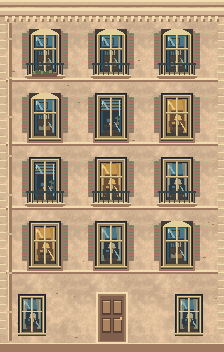
mediterranean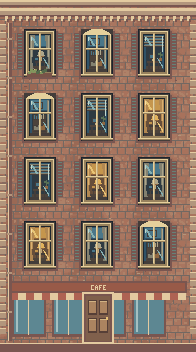
shopterraceTextures by najjar320 — Pixel Facades – 100 Building Textures.
↑ Contents2. The three pictures of a facade
Each facade is cut into three horizontal parts. All three have the same width (w) and the same scale: every floor is exactly floorRows pixels high.
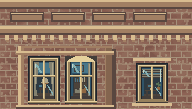
facade_brownstone_top.png192 × 109 px
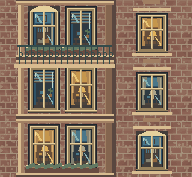
facade_brownstone_floors.png192 × 177 px
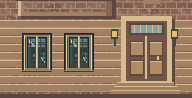
facade_brownstone_ground.png192 × 98 px
Brownstone, drawn at 1.1×. Red: where the three files are cut. Blue: the floors inside them. Right: the three files the game reads. The whole picture (facade_brownstone.png, 192×384) is only a preview.
| Picture | What it holds | How it is used |
|---|---|---|
_top | The roof edge (cornice, parapet) at its top, and under it the last floor of the building: exactly floorRows pixels. Its height is top = roof edge + floorRows. | Once, at the top of every wall. A low building gets only its roof-edge part. |
_floors | Whole floors, usually 3 (floorsInPart), each floorRows high, so floors = floorsInPart × floorRows. | Between top and ground, as many floors as the building needs; it repeats upwards for tall buildings. |
_ground | The ground floor: doors, shop fronts, steps, base. Any height (ground). | Once, at the foot of every wall. |
3. facades.json
One file for the whole mod. Sizes are in pixels of your pictures; the game turns them into metres from the floor height.
{
  "$schema": "https://www.thecitynauts.com/mods/facades.schema.json",
  "title": "Old Town",          // optional - the name shown in the game
  "map": "roadmap",            // optional - "roadmap" (default) or "satellite"
  "roofs": "flat",             // optional - "flat" (default) or "photo" (satellite only)
  "roofColor": "#3b3e44",      // optional - flat roof colour (satellite only)
  "floorMetres": 3.1,          // optional - how high one floor is drawn (default 3.1)
  "facades": [
    { "name": "brownstone", "w": 192, "top": 109, "floors": 177, "ground": 98,
      "floorRows": 59, "floorsInPart": 3 },
    { "name": "limestone", "w": 182, "top": 82, "floors": 174, "ground": 72,
      "floorRows": 58, "floorsInPart": 3 }
  ]
}
The comments above are only for this guide: JSON itself does not allow comments, so leave them out of your file. Fields the game does not know (like the note and metres in the game's own file) are ignored, so you can keep notes in them.
"$schema" line above, code editors such as VS Code read facades.schema.json: they show what each option does when you point at it, offer the options as you type, and underline a wrong value before you ever zip the mod. The game ignores the line.The mod
| Field | Value | Meaning |
|---|---|---|
$schema | the schema's address | Optional. Help for code editors (see above); the game ignores it. |
facades | list, 1 to 24 | Required. The facades of the mod. Each building gets one of them, picked by where it stands, so it is always the same one and they are spread evenly. |
title | text, up to 60 | Shown in the User Mod popup. Without it the zip's file name is used. |
map | "roadmap" / "satellite" | The map the mod is shown on. Default roadmap. |
roofs | "flat" / "photo" | On the satellite map: one colour, or the satellite photo of the real roof. Default flat. (On the roadmap roofs are always the game's dark grey.) |
roofColor | "#rrggbb" | The flat roof colour on the satellite map. Default #3b3e44. |
floorMetres | 2 to 6 | How many metres one floor (floorRows pixels) is on the buildings. Default 3.1. All facades of the mod share it. |
Each facade
| Field | Value | Meaning |
|---|---|---|
name | letters, digits, _ -; up to 40 | Required. Names the pictures: facade_<name>_top.png etc. Unique in the mod. |
w | 1 to 4096 px | Required. The width of all three pictures. |
top | 1 to 4096 px | Required. Height of _top: roof edge + one floor. Must be more than floorRows. |
floors | 1 to 4096 px | Required. Height of _floors: floorsInPart × floorRows. |
ground | 1 to 4096 px | Required. Height of _ground. |
floorRows | 1 to 4096 px | Required. The height of one floor in your pictures. It sets the scale: floorRows pixels = floorMetres metres. |
floorsInPart | 1 to 12 | How many floors the _floors picture holds. Default 3. |
floors or floorsInPart makes floors come out cut in the wrong place.4. How the game builds a wall
The game takes the real buildings of the map (their outline and height) and lays your pictures on every outside wall, 6 cm in front of it. Up the wall, from the bottom:
- the ground floor (
_ground), - as many floors as fit, taken from
_floorsfrom its top down and repeated for tall buildings, - the last floor and the roof edge (
_top).
The number of floors is the one that fits the building's height best; the whole stack is then stretched or squeezed a little to the exact height. Nothing is cut in the middle of a floor.
| Building height (wall) | What it gets |
|---|---|
| 2.6 m or lower | no facade (sheds, walls, kiosks) |
| too low for ground floor + roof edge | only the ground floor, stretched to the height (or nothing, if it would be squeezed below 72 %) |
| about ground floor + roof edge | the ground floor and the roof-edge part of _top |
| taller | ground floor + floors + top, as many floors as fit |
The same Brownstone on buildings of different heights, drawn exactly as the game does (here 8 m wide walls):
the ground floor alone
82 % high
ground floor + roof edge
+3 %
ground + 1 floor + top
−7 %
ground + 3 floors + top
−6 %
ground + 5 floors + top
−1 %
Brownstone: 19.0 px per metre (59 px = 3.1 m); ground floor 5.15 m, roof edge 2.63 m, each floor 3.1 m. The percentage is how much the stack is stretched (+) or squeezed (−) to the building's height.
_ground reads well when stretched a little, and a good _top works with and without the floor under its roof edge.5. Across a wall: tiling
Along a wall the pictures are laid side by side at their own size (w pixels = w / floorRows × floorMetres metres; about 10 m for the game's facades). They are not stretched to fit a wall, with one exception:
- When the wall is within 12 % of a whole number of pictures, the pictures are fitted to it exactly.
- Otherwise there are whole pictures in the middle and the same cut piece at both ends, so the wall looks centred.
- A wall narrower than one picture shows the middle of the picture.
- Straight runs of a building's outline (edges that turn less than about 10°) are tiled as one wall, so a gently curved street front stays continuous.
ground + 2 floors + top
−3 %
ground + 2 floors + top
−3 %
ground + 2 floors + top
−3 %
ground + 2 floors + top
−3 %
Limestone on 14 m high walls. 2.08 pictures: fitted: 2 whole tiles, squeezed 3.8 %; 2.5 pictures: 2 whole tiles, the same cut piece at both ends; 0.62 pictures: narrower than a tile: the middle of one.
Sizes of the game's facades
| name | w | top | floors | ground | floorRows | floorsInPart | px / m | one picture | ground floor | roof edge |
|---|---|---|---|---|---|---|---|---|---|---|
brownstone | 192 | 109 | 177 | 98 | 59 | 3 | 19.0 | 10.09 m | 5.15 m | 2.63 m |
limestone | 182 | 82 | 174 | 72 | 58 | 3 | 18.7 | 9.73 m | 3.85 m | 1.28 m |
artdeco | 210 | 84 | 186 | 74 | 62 | 3 | 20.0 | 10.50 m | 3.70 m | 1.10 m |
mediterranean | 224 | 83 | 192 | 77 | 64 | 3 | 20.6 | 10.85 m | 3.73 m | 0.92 m |
shopterrace | 196 | 84 | 192 | 76 | 64 | 3 | 20.6 | 9.49 m | 3.68 m | 0.97 m |
With floorMetres 3.1. Keep your facades roughly 8 to 12 m wide and at the same pixel density as each other, so neighbouring buildings look alike in detail.
6. Light and shade
The game shades the facades itself, so draw your pictures evenly lit, without a strong shadow of their own. Each wall is darkened by the way it faces: the sun stands in the south, a little to the west.
× 1
× 0.94
× 0.72
× 0.44
× 0.31
On top of that every wall is a little darker towards the ground: 70 % at its foot, full brightness at its top (the dark band at the bottom of each sample). Pictures are drawn with sharp pixels up close and smoothly far away, so pixel art stays crisp.
7. Maps and roofs
The game's own texture modes, in the Map menu, show the three combinations a mod can choose:
| Map menu | Mod settings | What you see |
|---|---|---|
| Textured | "map": "roadmap" (default) | The road map; facades on the walls; flat dark roofs. |
| Fully Textured | "map": "satellite" | The satellite photo as the ground; facades; flat roofs in roofColor. |
| Realistic | "map": "satellite", "roofs": "photo" | The satellite photo; facades; each roof shows the photo of the real roof above it. |
Facades are on the 3D map only; choosing a texture mode on the 2D map switches it to 3D. The map menu has one choice ticked at a time: Roadmap, Satellite, Night, or one of the texture modes. Picking Roadmap, Satellite or Night turns the textures off.
↑ Contents8. Packing the zip
Put facades.json and the pictures at the top of the zip:
├─ facades.json
├─ facade_brownstone_top.png
├─ facade_brownstone_floors.png
├─ facade_brownstone_ground.png
├─ facade_limestone_top.png
├─ facade_limestone_floors.png
└─ facade_limestone_ground.png
or all of them in one folder inside it:
└─ old-town/
├─ facades.json
├─ facade_brownstone_top.png
└─ ...
Zipping a folder with Windows "Send to › Compressed folder" or macOS "Compress" gives this layout. The pictures must be in the same folder as facades.json.
- Picture names:
facade_<name>_top,_floors,_ground, with.png,.jpg/.jpegor.webp. Upper or lower case does not matter. - Other files (a preview, a readme, your source files) may be in the zip; they are ignored. Hidden files and macOS
__MACOSXfolders are skipped. - PNG is best for pixel art: no blur, transparency kept. Transparent pixels show the building's grey wall behind them.
Limits
| What | Limit |
|---|---|
| the zip | 25 MB, 400 files |
| facades in a mod | 24 |
| one picture | 8 MB, 4096 × 4096 px |
| facades.json | 200 kB |
9. Loading a mod in the game
From your device: User Mod
Map menu › User Mod › Choose zip file... The mod is checked, shown at once, and kept in this browser: next time User Mod offers Use this mod or another zip. Tapping the ticked User Mod again turns it off.
From the internet: Mod Link...
Map menu › Mod Link..., paste the https:// address of the zip, Download. It is then kept and used the same way as a zip from your device.
One mod is kept at a time; a new one replaces it. The chosen mode is remembered, so the game starts with your mod on.
↑ Contents10. Sharing a mod
Mod Link downloads the zip straight from the browser, so the site it is on must allow other sites to download its files (it sends the CORS header Access-Control-Allow-Origin). Many do not.
| Where | Works with Mod Link? |
|---|---|
GitHub, raw file linkhttps://raw.githubusercontent.com/<user>/<repo>/main/old-town.zip | Yes. Put the zip in a public repository and copy the link of the Raw button. |
GitHub Pageshttps://<user>.github.io/<repo>/old-town.zip | Yes. |
| Your own site or a storage bucket | Yes, if it sends Access-Control-Allow-Origin: * for the zip. |
| GitHub Releases download links | Usually not (their redirect does not allow it): use a raw link instead. |
| Google Drive, Dropbox, OneDrive, WeTransfer, Discord | No. Share the zip there for people to download and load with User Mod instead. |
https:// links are taken, and links with a login in them are not used. The zip is checked the same way as one from a device.Licence and credit
Only share textures you made or may share. If your mod is based on someone's texture pack, follow its licence and credit its author in your mod's page or readme, as this guide does for najjar320's Pixel Facades.
↑ Contents11. When a mod is refused
The game says exactly what is wrong; nothing of a refused mod is used and the mod you had stays.
| Message | What to do |
|---|---|
| That is not a zip file. | The file is not a zip, or it is damaged. Make it again with your system's "Compress" / "Send to zip". |
| There is no facades.json in the zip (at its top, or in one folder). | Put facades.json at the top of the zip, or inside one folder at most (my-mod/facades.json). |
| facades.json is not valid JSON. | A comma or quote is wrong. Check it in any JSON checker. |
| facades.json has no "facades" list. | The file needs "facades": [ ... ] with at least one facade. |
| A mod can have 24 facades at most. | Split it into several mods. |
| … needs a "name" of letters, digits, _ or - (40 at most). | Names like old_town-2. No spaces, dots or slashes. |
| the name "…" is there twice. | Each facade needs its own name (letter case ignored). |
| "… w" must be a number from 1 to 4096. | Every size is a whole number of pixels, 1 to 4096 (floorsInPart 1 to 12, floorMetres 2 to 6). |
| "floorRows" must be less than "top" | The top picture holds the last floor AND the roof edge above it, so it is taller than one floor. |
| Missing picture: facade_…_top.png | Each facade needs its three pictures, named exactly facade_<name>_top / _floors / _ground (.png, .jpg or .webp), next to facades.json. |
| … is not a PNG, JPEG or WebP picture. | Only real pictures are read. Re-export it as PNG. |
| … is too big: 8 MB at most. | Make the picture smaller, or save it as PNG with fewer colours. |
| The mod is too big: 25 MB at most. | The whole zip must be under 25 MB. |
| Some of its pictures could not be read (or are bigger than 4096 dots a side). | A picture is broken, or wider / taller than 4096 px. |
| That site does not let the game download the file. … | Mod Link only: the site does not allow downloads from other sites. Host the zip where it does (see "Sharing a mod"). |
| The link answered 404 - check that it is right. | Mod Link only: the address is wrong, or the file is private. |
| Only https:// links can be used. | Mod Link only: use the https:// address of the file. |
12. Checklist, tips and credits
Before you share
- All three pictures of a facade have the same width, written as
w. top= roof edge +floorRows;floors=floorsInPart×floorRows.- Left and right edges join; the floors picture's top and bottom join.
- Edges of the pictures look fine when cut (no half windows at the edges).
- Even lighting, no baked-in shadows.
- The zip loads with User Mod without a message; look at low, middle and tall buildings, and at the north (darkest) side.
- Credit the textures' author if they are not yours.
Tips
- Start from demo-mod.zip: change one facade, zip, load, look.
- More facades = more variety on a street; 5–10 is a good number.
- Keep the floor height in pixels the same for all your facades (e.g. 59 or 64), so they share one scale.
- Shop fronts, doors and steps belong in
_ground; balconies and window rows in_floors; cornices, parapets and roof lines in_top.
Credits
The example facades — Brownstone, Limestone, Art Deco, Mediterranean and Shop Terrace — shown throughout this guide and used by the game are from
Pixel Facades – 100 Building Textures by najjar320
https://najjar320.itch.io/pixel-facades-100-building-textures
The Citynauts · Facade Mods Guide · for the map menu's Textured, Fully Textured, Realistic, User Mod and Mod Link... modes. Also as a PDF.
↑ Contents